
Smart homes
Smart home automation that is useful on a Tuesday night
The most useful smart home features are the ordinary ones: hallway lights that come on low at night, heating that is warm before you get home, an alert when the garage door is left open. We wire and set up lighting control, heating and cooling control, sensors and security so they are reliable, easy for everyone in the house to use, and still work as normal switches when the internet is down.
Practical smart home wiring and set-up for Auckland homes: lighting control, heat pump control, sensors and security on one app.
Talk through a smart home planStart with what you want the house to do
Most smart home disappointment comes from buying devices first and working out the purpose later. We start with routines: what happens when you wake up, leave, come home, go to bed or go away for a week. Then we choose the switches, sensors and controllers that make those routines happen with as few apps as possible.
A smart home should never make the basics harder. Light switches should still work like light switches for guests, children and whoever looks after the house when you are away. If a system needs a manual to turn the kitchen lights on, it has been set up wrong.
One house, every system
Planned together, so it all works together
Lighting, power, heating and cooling, ventilation, EV charging, cameras, the alarm and data all run through the same switchboard and the same ceiling and wall spaces.
Planning them as one job means the cabling, power and network for each is in place before the linings go on, instead of being retrofitted later.
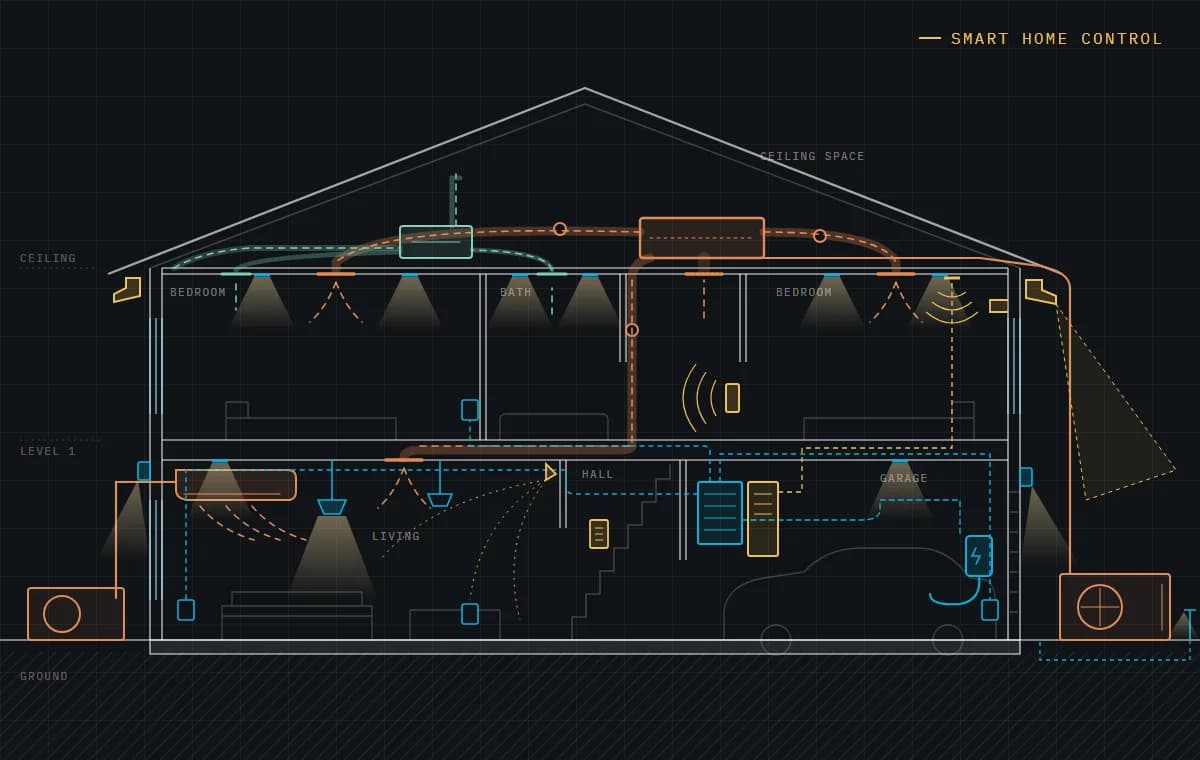
A two-storey house is drawn in section. Interior and exterior lighting switch on, then the switchboard and power circuits. A high-wall heat pump starts in the living room, and a ducted system in the ceiling space sends air to each room. Ventilation, an EV charger in the garage, and CCTV, alarm and data systems follow.
Describe this animation
A two-storey house is drawn in section. Interior and exterior lighting switch on, then the switchboard and power circuits. A high-wall heat pump starts in the living room, and a ducted system in the ceiling space sends air to each room. Ventilation, an EV charger in the garage, and CCTV, alarm and data systems follow.
What can be automated
Lighting control
Smart switches and dimmers, scenes for cooking, dining and movies, lights on a schedule while you are away, and low-level night lighting triggered by motion. Pairs well with our lighting design work.
Heating and cooling control
App and schedule control of heat pumps through the manufacturer's Wi-Fi control, and room-by-room control of ducted systems with zoning. Pre-heat the house on the way home or turn off a unit someone left running.
Sensors
Motion, door and window, temperature, humidity and water leak sensors. A humidity sensor can run a bathroom fan; a leak sensor under the dishwasher can send an alert before the floor is ruined.
Security integration
Alarm status, camera views and the front door intercom on the same app, and lights that come on if the alarm is triggered.
Garage doors and gates
See whether the garage door is open, close it from your phone, and get a notification if it has been left open after dark.
Energy and EV charging
Some smart EV chargers and appliances can be scheduled for off-peak times, and power monitoring shows where your electricity is going.
Wired and wireless smart systems
There are two broad approaches, and many homes use a bit of both.
| Wired control system | Wireless smart devices | |
|---|---|---|
| How it works | Switches, sensors and controllers connected by dedicated control cabling to a central system | Individual smart switches, plugs and sensors talking over Wi-Fi or a low-power wireless network |
| Best time to install | New builds and major renovations, while walls are open | Any time, including finished homes |
| Strengths | Very reliable, scales to the whole house, does not depend on Wi-Fi | Lower upfront cost, easy to start small and add over time |
| Watch-outs | Higher upfront cost, and programming changes may need the installer | Mixing brands can mean several apps; some devices rely on cloud services |
Wiring for a smart home before the walls close
Even if you buy the devices later, these are far cheaper to do at the pre-wire stage.
- A neutral conductor at every light switch, which many smart switches and dimmers need
- Deeper switch boxes where larger smart dimmers will go
- Data cable to a central network cabinet and ceiling Wi-Fi access points
- Cable to each planned camera, door station and alarm keypad
- Cable or a spare conduit to the heat pump or ducted controller location
- Power and data near blinds or curtains you might motorise later
- Circuits grouped and labelled on the switchboard so lighting zones make sense
How we approach a smart home project
- STEP 01
Routines first
We talk through how the household uses the home and which tasks are worth automating.
- STEP 02
System choice
We recommend a wired, wireless or mixed approach and the devices that fit your budget and the age of the house.
- STEP 03
Wiring
Neutral conductors, data cable and control wiring go in with the electrical pre-wire or as part of the renovation.
- STEP 04
Set-up and scenes
Devices are installed, connected to your network and app, and scenes and schedules are set up and tested.
- STEP 05
Handover
We show everyone in the house how it works, including what still works if the internet or app goes down.
FAQ
Smart home automation: common questions
Do I need to rewire my house for smart switches?
Not usually. Many smart switches can be fitted to existing wiring, although some need a neutral at the switch, which older homes often lack. We check the wiring and recommend switches that suit it.
Can I control my heat pump from my phone?
Most current heat pumps from the major brands have a Wi-Fi control option, either built in or as an add-on adaptor. It lets you turn the unit on or off, change modes and set schedules from an app. Ducted systems can also be controlled room by room with a zone controller.
What happens to my smart home if the internet goes down?
It depends on the system. A well set-up home still has working wall switches and local automations, and only loses remote control from outside the house until the connection returns. Devices that rely entirely on a cloud service may stop responding, which is one reason we favour systems that can run locally.
Will it work with Google, Apple or Alexa?
Many devices work with one or more of the major voice assistants and home apps, but not every device works with every platform. Tell us which you already use and we will choose devices that suit it.
Can I add smart features later?
Yes, especially with wireless devices. The most important thing to get right during a build is the wiring: neutrals at switches, data cable and a network cabinet. With those in place, adding devices later is simple.
Is smart home automation worth it?
Done modestly, it is. Automating lighting for night-time and away periods, controlling heating and cooling from your phone and getting alerts for doors and leaks are useful in most homes. Automating everything rarely is. We would rather help you choose a few features you will use every day.
Talk through a smart home plan
Building, renovating or adding to an existing home? Tell us what you would like the house to do and we will suggest a practical way to get there.
More on smart home automation
Keep exploring
Services and tools