
Switchboard upgrades
Modern RCD protection, and the capacity for everything you add next
The switchboard protects every circuit in the house. Older boards were built for a few lights, a stove and a hot water cylinder, not induction cooktops, EV chargers and today's appliances. Plexus replaces old fuse boards, adds RCD protection and checks the capacity for whatever you plan to add, so the board is sized for the whole house rather than one new appliance.
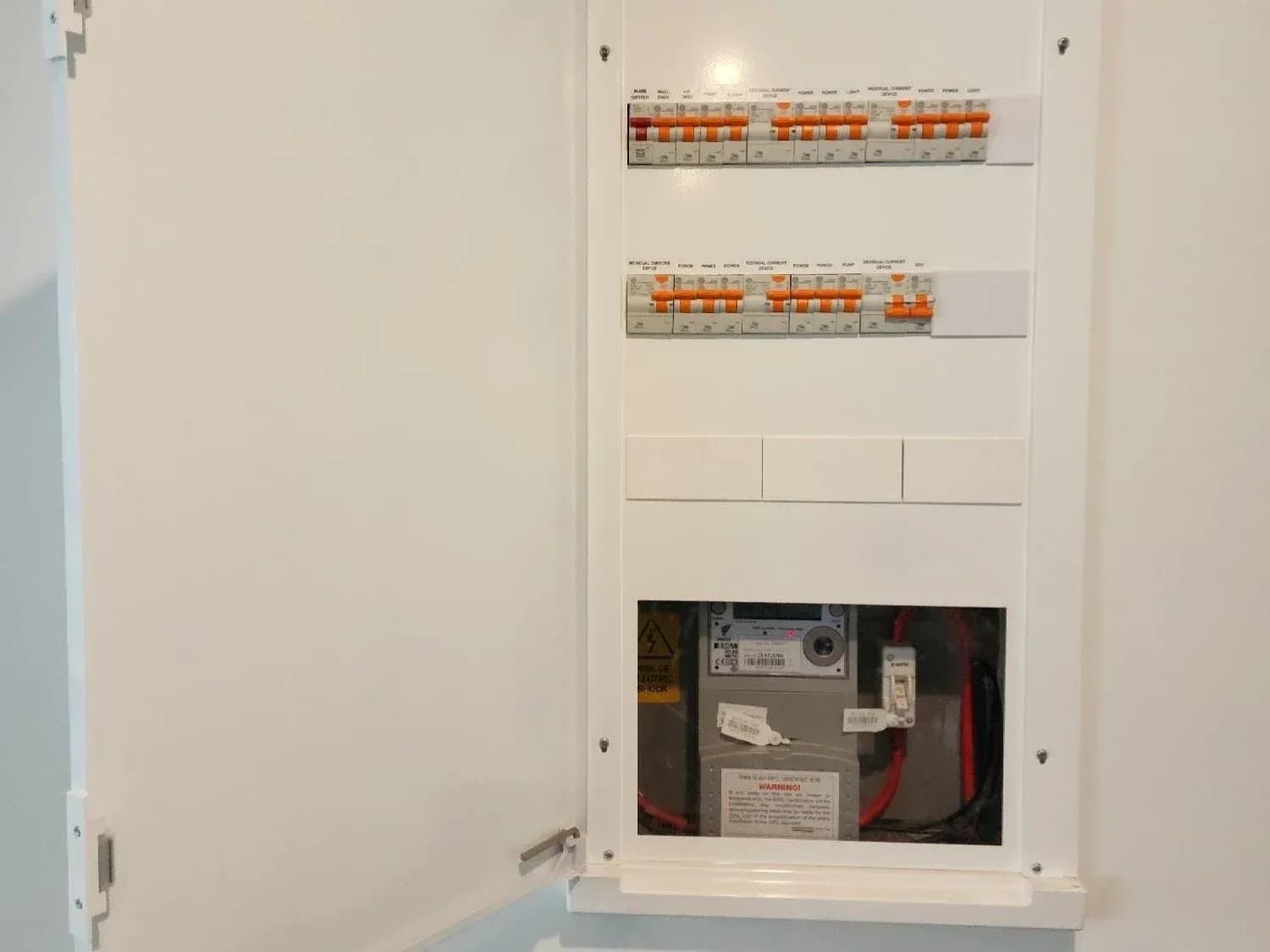
A modern board with labelled circuits grouped under RCDs.
Replace old fuse boards, add RCD protection (and surge protection if you want it), and make room for EV chargers, induction cooking and new circuits.
Get your switchboard assessedOld board vs new
What actually changes when a switchboard is upgraded
Tap any part of each board to see what it does. The biggest difference is RCD protection, which switches off in milliseconds if current leaks through a person.
Illustrative layout. Select any device to see what it does, and swipe sideways to see the whole board.
Old fuse board
Rewireable fuses
A length of fuse wire that melts when a circuit is overloaded. It protects the cable, not people, and it is easy to replace with the wrong size of wire. It has to be rewired after every fault.
How it works
What is inside a switchboard
The main switch isolates the whole installation. Circuit breakers (MCBs) protect each circuit's cable from overload and short circuits. RCDs watch for current leaking to earth, for example through a person, and switch the circuit off very quickly. Some boards use RCBOs, which combine both functions on a single circuit.
A well-laid-out board groups circuits so that a single fault does not take out every light in the house, and every device is labelled so you know what it controls.
Signs your switchboard needs attention
One of these on its own may not mean a new board, but each is worth having checked.
- Rewireable ceramic fuses rather than circuit breakers.
- No RCDs, or only one RCD covering a few circuits.
- Scorch marks, a burning smell, buzzing, or devices that feel warm.
- Breakers that trip regularly when several appliances run at once.
- No spare space for new circuits.
- An old timber or asbestos-backed panel. Do not drill or disturb it.
- Labels missing or wrong, so nobody knows which circuit is which.
- You are planning an EV charger, induction cooktop, spa, extra circuits or a heat pump.
RCD protection: the main reason to upgrade
An RCD (residual current device) detects when current is leaking to earth, which is what happens if someone touches a live part, and disconnects the supply fast enough to reduce the risk of a fatal shock. Many older Auckland homes have no RCD protection, or only partial protection added later.
New circuits have to meet the current wiring rules, so adding a circuit to an old board can mean the board needs work first. When we quote, we will tell you what protection your board has now, what we recommend, and why.
Our guide to signs you need a switchboard upgrade and our explainer on RCD protection go into more detail.
Surge protection: what an SPD does
A surge protection device (SPD) is fitted in the switchboard. In normal use it does nothing. When a short voltage spike arrives on the supply, for example from lightning striking nearby lines or from switching on the network, the SPD diverts the excess energy to earth before it reaches the circuits in the house.
That helps protect equipment with sensitive electronics: TVs, computers and network gear, appliance control boards, EV chargers and heat pump controls. An SPD is not a substitute for RCD protection (which protects people) or for circuit breakers (which protect cables), and no device can protect against a direct lightning strike. SPDs also wear out after absorbing surges, and many have a status indicator that shows when the device needs replacing. Plug-in surge protectors at the TV or computer can still be useful alongside a board SPD.
Surge protection is an optional extra, not a standard part of every upgrade. It is worth considering when the board is being replaced anyway, because adding it then is a small part of the job, and in homes with a lot of expensive electronics, an EV charger, or an overhead supply line. We will tell you whether we think it is worthwhile for your house when we quote.
Capacity for the big new loads
Most homes adding large loads need a capacity check. This is what we look at for each.
| Adding | What we check | Related |
|---|---|---|
| EV charger | A dedicated circuit, the charger's protection requirements, and whether load management is needed | EV charger installation |
| Induction cooktop or oven | Circuit rating and cable size for the appliance | Power points and appliances |
| Spa pool | A dedicated, protected circuit and isolation | Spa pool electrical |
| New lighting and power circuits | Spare ways on the board and RCD protection for the new circuits | Renovation electrical |
| Heat pump or ducted system | A dedicated circuit, an isolator near the outdoor unit, and the total load with everything else running | Heat pump installation |
What a switchboard upgrade involves
- STEP 01
Assess
We inspect the existing board, test the circuits and talk through what you plan to add.
- STEP 02
Quote
A written quote with the new board layout, the protection on each circuit and any extra work found in testing.
- STEP 03
Book the shutdown
The power is off while the board is changed. We agree a time that suits you and let you know what to expect.
- STEP 04
Replace and relabel
The new board is installed, existing circuits are reconnected with the right protection, and everything is labelled clearly.
- STEP 05
Test and certify
Every circuit is tested before power is restored, and you receive a Certificate of Compliance and an Electrical Safety Certificate.
What affects the cost
We do not publish a fixed price, because the cost depends on the size of the board, how many circuits need RCD protection, the condition of the existing wiring, whether the board must move, and whether any faults turn up in testing. Our article on switchboard upgrade costs in NZ explains the factors.
FAQ
Switchboard upgrades: common questions
Do I need a switchboard upgrade for an EV charger?
It depends on the board's space and condition and on your total load. A smart charger with load management can sometimes avoid an upgrade by reducing charging when the house is busy. See EV charger installation.
Should I add surge protection?
It is optional, and we can fit it if you want it. It is often worth it when the board is being replaced, particularly if you have expensive electronics or an EV charger. A surge protection device limits voltage spikes from the network or nearby lightning. It does not replace RCD protection and cannot stop a direct strike.
Do I need a switchboard upgrade for a heat pump?
Not always. A single high-wall heat pump often fits on an existing board if there is space and capacity. Ducted systems, several heat pumps or an old board with no RCDs are more likely to need work. We check this as part of the heat pump quote, since we do both.
How long will the power be off?
That depends on the size of the board and what testing finds. We will tell you the expected shutdown when we quote and book a time that suits you.
My house still has fuses. Is that dangerous?
Rewireable fuses are not dangerous in themselves when correctly rated and in good condition, but they offer less protection than modern breakers and usually mean the house has no RCD protection. It is worth having the board assessed.
Is an RCD the same as a circuit breaker?
No. A circuit breaker protects the cable from overload and short circuit. An RCD protects people by detecting current leaking to earth. Many modern boards use RCBOs, which do both on one circuit.
Can I replace or add to the switchboard myself?
No. Replacing or altering a switchboard is not among the limited tasks homeowners may do under regulation 57 of the Electricity (Safety) Regulations 2010. Apart from replacing fuse links, switchboard work must be done by a licensed electrical worker.
Will I get a certificate?
Yes. We issue a Certificate of Compliance for a switchboard replacement, and you receive an Electrical Safety Certificate once the installation is reconnected. Keep both with your property records.
What customers say
5.0 from 47 Google reviewsCustomer reviews
“Ryan and his team are absolutely fantastic: professional, punctual, with clear quotes and excellent communication. They offer both renovation and upgrade services for existing homes, as well as wiring and installations for new builds. I’m extremely satisfied with the upgrade they did for my home. A 5-star recommendation!”
“Ryan and his team are wonderful company to deal with, very professional, prompt, polite and friendly. They worked with us on what we wanted, and delivered, working around any issues that were found with our existing wiring. Overall, very happy.”
“Super professional guys, did a number of jobs for us, from a single power point installation to rewiring entire room and installing new lights. Ryan is down to earth and straight to the point man, absolute pleasure to deal with. Heavily recommended.”
Get your switchboard assessed
Send a photo of your switchboard and tell us what you are planning to add. We will come back with next steps.
More on switchboard upgrades
Keep exploring
Services and tools